Stay Ahead, Stay Secure: Seamless Upgrades for Your Cluster
A practical guide to upgrading Kubernetes clusters and operating systems safely, with automated, low-risk processes—no disruption or manual emergencies.
5 min read
29 April 2026
Copenhagen, Denmark
With the Asergo Managed Platform for Kubernetes (APK), you can upgrade the following components with a single click for each, ensuring a seamless, low-risk process without application downtime:
- Operating System
- Kubernetes
- Network Stack
Outdated software is more than technical debt, it is a security risk, a performance drag, and a compatibility liability. However, upgrading does not have to be disruptive. Our system automates the process for each component, making updates incremental and non-disruptive, so you stay current effortlessly.
Why Upgrades Matter
Security: Protect Your Cluster from Exploits
Every new release of Kubernetes and the underlying operating system includes critical security patches that address vulnerabilities. Running outdated versions exposes your cluster to exploits, compliance violations, and breaches.
- Fifty-nine percent of organisations report Kubernetes security incidents, many of which are tied to unpatched versions (Source: Red Hat, 2023).
- Attackers actively target known vulnerabilities in older releases, turning unpatched clusters into easy targets.
- Compliance standards, such as PCI-DSS, SOC 2, and GDPR, require up-to-date software. Falling behind risks audits and penalties.
Performance and Stability: Avoid the Slow Decline
Outdated versions miss out on:
- Bug fixes that prevent crashes, memory leaks, and race conditions.
- Performance optimisations that reduce latency and improve resource efficiency.
- Compatibility updates that ensure smooth integration with modern tooling, such as Helm, Istio, and monitoring solutions.
Skipping upgrades leads to slower responses, unexpected outages, and technical debt that becomes increasingly difficult to manage over time.
Avoid the «Big Bang» Upgrade Nightmare
The longer you wait, the harder the upgrade process becomes. Jumping multiple versions at once introduces:
- Breaking changes in Application Programming Interfaces (APIs), storage drivers, and networking.
- Deprecated features that force last-minute rewrites.
- Emergency fire drills when you must upgrade immediately because a critical Common Vulnerabilities and Exposures (CVE) is announced.
Our approach focuses on small, frequent updates, ensuring you never need to play catch-up.
Upgrade Planning Made Simple
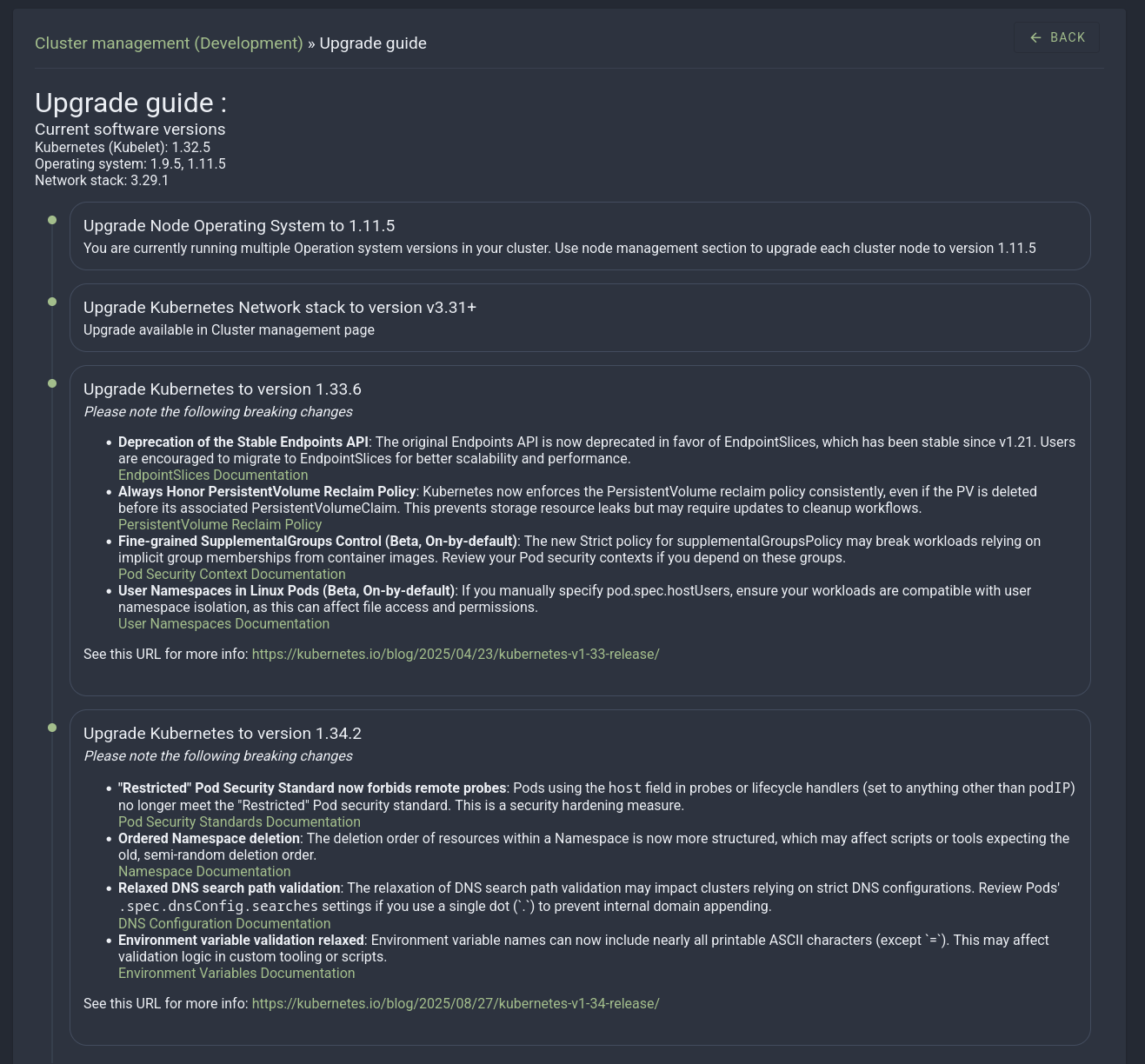
Managing cluster upgrades doesn’t have to be a headache. With Asergo’s Upgrade Planning Guide, available right in your dashboard under Cluster Management, you get a clear, actionable roadmap tailored to your environment.
- See your current versions and the latest stable releases in one place.
- Follow step-by-step instructions to upgrade efficiently, with minimal risk.
- Stay ahead of compatibility issues and security updates.
No more digging through documentation or worrying about breaking changes. Just confident, streamlined upgrades, every time.
Below, you’ll find a preview of what the guide looks like in action. 
Why You Should Always Upgrade Workers Before Masters
Upgrading worker nodes before control plane nodes minimizes risk and ensures cluster stability:
Stable Control Plane: Your control plane remains operational and stable while you test the new version on worker nodes. This allows you to identify and address any issues (such as CNI or kubelet behavior) without impacting cluster management.
Safe Workload Management: Workloads can be drained or migrated safely using standard Kubernetes mechanisms, reducing downtime and disruption.
Isolated Testing: If something goes wrong during the worker node upgrade, the control plane remains intact, making troubleshooting and rollback easier. Then Upgrade Control Plane Nodes
Once all worker nodes are confirmed healthy and running smoothly:
Upgrade control plane nodes one at a time to maintain quorum and ensure API availability throughout the process.
The Pitfalls of Upgrading Masters Before Workers
Upgrading the control plane first introduces unnecessary risks:
API Instability: The cluster’s API may become unstable, affecting workloads and management operations.
Version Skew Issues: Incompatibilities between the upgraded control plane and older worker nodes can lead to operational issues.
Troubleshooting Challenges: If the control plane is degraded, diagnosing and resolving issues becomes significantly harder.
Exception (Edge Case)
In rare cases, such as upgrades that include critical control plane fixes or version skew constraints requiring the API to be upgraded first, you may need to upgrade the control plane nodes first. Even in these cases, proceed one node at a time to maintain quorum and API availability.
Our Upgrade Philosophy: Zero Downtime, Zero Stress
Operating System Upgrades: Proceed at Your Pace, Without Downtime
Upgrading your operating system should never require a disruptive maintenance window. With our platform, you control the process:
- Update one to two nodes at a time—simply choose a low-traffic period, select a node, and let the system manage the rest.
- Experience zero impact on workloads, as your cluster remains fully operational while nodes upgrade sequentially.
- Rest easy with automated rollback—if any issues arise, the system reverts changes automatically, so your environment stays protected at all times.
How Do We Achieve This?
- We use an immutable operating system based on the Talos Linux (http://talos.dev) design to ensure consistency, with no configuration drift.
- Self-healing nodes automatically rejoin the cluster post-upgrade.
- Built-in health checks verify everything before proceeding with the upgrade.
Pro Tip: Spread upgrades over time. There is no need to update everything at once. Maintain a steady rhythm to stay current without disruption.
Kubernetes Upgrades: Plan Strategically, Test First
Unlike operating system updates, Kubernetes upgrades are a cluster-wide process. While workloads remain running, the API may experience brief timeouts during the transition. This is where strategic planning is essential:
- Test first in your development cluster. Mirror your production setup and verify compatibility.
- Check for deprecated APIs. Some Kubernetes features are removed over time.
- Schedule upgrades during low-traffic periods to minimise any minor interruptions in API responsiveness.
We simplify the process:
- One-click upgrades are available through the dashboard.
- Pre-flight checks identify potential issues before they occur.
- Detailed logs and rollback options are provided if needed.
Risk Mitigation
| Risk | Impact | How We Prevent It |
|---|---|---|
| Security breaches | Exploited vulnerabilities, data leaks, compliance failures | Automatic container scanning for CVE vulnerabilities |
| Performance degradation | Slower responses, inefficient resource use, crashes under load | Regular updates with performance fixes |
| Compatibility issues | Broken integrations with Container Network Interface (CNI), storage, or monitoring tools | Version-aware testing in development |
| Emergency upgrades | Forced, high-risk updates when you are already behind | Incremental upgrades keep you current |
Your Action Plan: Stay Current Without the Hassle
1. Operating System Upgrades: The «Friday Afternoon» Approach
- Select one to two nodes per week—no rush, no pressure.
- Let automation handle the process. Nodes drain, upgrade, and rejoin seamlessly.
- Monitor progress and repeat. A slow and steady approach keeps your cluster secure.
2. Kubernetes Upgrades: Test, Then Deploy
- Use your development cluster to mirror production and verify compatibility.
- Check logs for deprecation warnings and address them before upgrading.
- Schedule the upgrade. Our system handles the rest, with minimal API downtime.
3. Set It and (Mostly) Forget It
- Enable automated notifications for new stable releases.
- Use our dashboard to track upgrade status across your cluster.
- Let us handle the heavy lifting—no manual scripts, no late-night fire drills.
The Bottom Line: Upgrades Should Be Effortless
With the Asergo Managed Platform for Kubernetes (APK), keeping your cluster current is not a chore—it is simply part of the routine. Small, frequent updates ensure:
- No security panic when a new CVE is announced.
- No performance surprises from outdated software.
- No emergency weekends spent fixing broken upgrades.
Stay current with minimal effort. Your security team will appreciate the reduced risk.
Ready to simplify your upgrades? Contact Our Team.